Selector - 基本格式與選擇器
一、CSS基本格式:
主要格式為
selector {
property : value ;
}
1、如果是色彩要給值則請用"#"字號
2、可直接指定色彩名稱...等等
3、可使用雙引號指定字體樣式
4、可使用以piexl為單位指定數值
<!DOCTYPE html> <html> <head> <style> body { background-color: #d0e4fe; } h1 { color: orange; text-align: center; } p { font-family: "Times New Roman"; font-size: 20px; } </style> </head> <body> <h1>My First CSS Example</h1> <p>This is a paragraph.</p></body>
</html>
二、CSS註解:
可分為使用 /**/ 單行註解與多行註解,注意CSS沒有使用雙反斜線 // 來註解的,那是JavaScript在使用的
<!DOCTYPE html> <html> <head> <style> p { color: red; /* This is a single-line comment */ text-align: center; }<span style="color:#008000;">/* This isa multi-line
comment */
</style>
</head>
<body>
<p>Hello World!</p>
<p>This paragraph is styled with CSS.</p>
<p>CSS comments are not shown in the output.</p></body>
</html>
三、選擇器selectors
選擇器可分為 element selector、id selector、class selector...等等。
1、element selector
<!DOCTYPE html>
<html>
<head>
    <style>
        p {
            text-align: center;
            color: red;
        }
    </style>
</head>
<body>
    <p>Every paragraph will be affected by the style.</p>
    <p id="para1">Me too!</p>
    <p>And me!</p>
</body>
</html>
2、id selector
請注意id selector格式前面要加個 # 字號
<!DOCTYPE html>
<html>
<head>
    <style>
        #para1 {
            text-align: center;
            color: red;
        }
    </style>
</head>
<body>
    <p id="para1">Hello World!</p>
    <p>This paragraph is not affected by the style.</p>
</body>
</html>
3、class selector
請注意id selector格式前面要加個 . 字號
<!DOCTYPE html>
<html>
<head>
    <style>
        .center {
            text-align: center;
            color: red;
        }
    </style>
</head>
<body>
    <h1 class="center">Red and center-aligned heading</h1>
    <p class="center">Red and center-aligned paragraph.</p>
</body>
</html>
4、其他
(1)、指定當<p>tag裡面的class為center時則套用該CSS樣式
<!DOCTYPE html>
<html>
<head>
    <style>
        p.center {
            text-align: center;
            color: red;
        }
    </style>
</head>
<body>
    <h1 class="center">This heading will not be affected</h1>
    <p class="center">This paragraph will be red and center-aligned.</p>
</body>
</html>
(2)、指定當<p>tag裡面的id為myId時則套用該CSS樣式
<!DOCTYPE html>
<html>
<head>
    <style>
        p#myId {
            text-align: center;
            color: red;
        }
    </style>
</head>
<body>
    <h1 class="center">This heading will not be affected</h1>
    <p id="myId">This paragraph will be red and center-aligned.</p>
</body>
</html>
(3)、多重class選取
<!DOCTYPE html>
<html>
<head>
    <style>
        .c1 {
            text-align: center;
        }

        .c2 {
            color: red;
        }
    </style>
</head>
<body>
    <h1 class="c1 c2">Hello World!</h1>
    <h2>Smaller heading!</h2>
    <p>This is a paragraph.</p>
</body>
</html>
此表示tag<h1>把c1與c2 class一起加進來套用
承上,再來看一個特別的例子
<!DOCTYPE html>
<html>
<head>
    <style>
        .c1 {
            text-align: center;
        }

        .c2 {
            color: red;
        }

        .c1.c2 {
            color: blue;
        }
    </style>
</head>
<body>
    <h1 class="c1 c2">
        Hello
        <span class="c2">fff</span>
        World!
    </h1>
    <h2>Smaller heading!</h2>
    <p>This is a paragraph.</p>
</body>
</html>
結果為
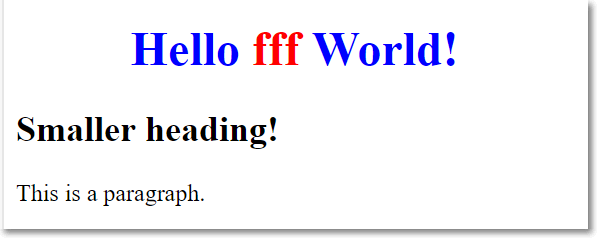
h1元素同時指定了c1與c2樣式,也做了文字置中與文字顏色變紅,
但為何Hello World!文字為藍色呢?因為在CSS裡雖然已經各別指定了.c1、.c2樣式,
但有沒有注意到,最後還加注了 .c1.c2樣式(黃色框框),這也是與 <h1 class="c1 c2"> match到,
故,Hello World!被洗成藍色了。至於紅字 fff 呢?有沒看到 <span class="c2"> ,
所以自然而然地被.c2樣式套成紅字了。
<!DOCTYPE html>
<html>
<head>
    <style>
        .c1 {
            text-align: center;
        }

        .c2 {
            color: red;
        }

        .c1.c2 {
            color: blue;
        }
    </style>
</head>
<body>
    <h1 class="c2 c1">
        Hello
        <span class="c2">fff</span>
        World!
    </h1>
    <h2>Smaller heading!</h2>
    <p>This is a paragraph.</p>
</body>
</html>
在HTML裡
<h1 class="c2 c1"> 和 <h1 class="c1 c2"> 與
在CSS裡
.c1.c2 和 .c2.c1 樣式,
其結果都是一樣的並沒有順序之分。
四、選擇器 selectors 的進階特性
1、Grouping selector
例子:表示<h1>、<h2>、<p> tag 都使用相同的CSS樣式,這符號「,」有OR的意思
<!DOCTYPE html>
<html>
<head>
    <style>
        h1, h2, p {
            text-align: center;
            color: red;
        }
    </style>
</head>
<body>
    <h1>Hello World!</h1>
    <h2>Smaller heading!</h2>
    <p>This is a paragraph.</p>
</body>
</html>
本來應該為
h1 {
    text-align: center;
    color: red;
}

h2 {
    text-align: center;
    color: red;
}

p {
    text-align: center;
    color: red;
}
濃縮成
h1, h2, p {
    text-align: center;
    color: red;
}
2、Grouping selector比任何selector擁有優先權
<!DOCTYPE html>
<html>
<head>
    <meta charset="utf-8">
</head>
<body>
    <div class="b148201">
        <table>
            <tr>
                <th>name</th>
                <th>discription</th>
            </tr>
            <tr>
                <td>a</td>
                <td>Downcase'a</td>
            </tr>
            <tr>
                <td>A</td>
                <td>Upcase'a</td>
            </tr>
        </table>
    </div>
</body>
</html>
CSS套用的樣式為
div.b148201 > table ,th ,td {
    border: 1px solid black;
    border-collapse: collapse;
}
其意思為「div.b148201 > table」與「th」與「td」都要套用
border: 1px solid black;
border-collapse: collapse;
樣式,但是這有個問題,
「th」與「td」如果沒限制範圍的話將會把該頁面所有的「th」與「td」都套用上去,
所以保險的做法應該修改如下
div.b148201 table ,div.b148201 th ,div.b148201 td {
    border: 1px solid black;
    border-collapse: collapse;
}
這樣就可以限定在「div.b148201」範圍內,對「table」、「th」、「td」套用樣式。
参考資料:
前端資源區來自於高雄前端社群每日所收集的前端好文與備份檔(這內容已經是超過CSS範圍了)