Regular Expression Options
inline options 有五種
| Option | Description | RegexOptions |
| i | Use case-insensitive matching. | IgnoreCase |
| m | Use multiline mode. ^ and $ match the beginning and end of a line, instead of the beginning and end of a string. | Multiline |
| n | Do not capture unnamed groups. | ExplicitCapture |
| s | Use single-line mode. | Singleline |
| x | Ignore unescaped white space in the regular expression pattern. | IgnorePatternWhitespace |
RegexOptions 是一個列舉,其有十種狀態
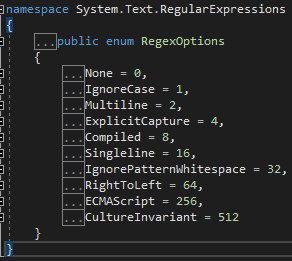
一、None
其實就是 regular expression engine 的預設設定,
而 regular expression engine 的預設設定為
not ECMAScript、LeftToRight、not IgnoreCase、
not IgnorePatternWhitespace、not CultureInvariant、not ExplicitCapture、
「.」被識為任一字元,除了「跳行」之外。
二、IgnoreCase
原本 regular expression engine 是 case-sensitive,
設定 RegexOptions.IgnoreCase 可讓 regular expression engine 不區分大小寫。
三、Multiline
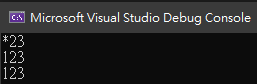
使用 Multiline 前
using System;
using System.Text.RegularExpressions;

namespace ConsoleApp1
{
    class Program
    {
        static void Main(string[] args)
        {
            string pattern = @"^1{1}";
            string str = "123\n123\u000a123";
            string result = Regex.Replace(str, pattern, "*");
            Console.WriteLine(result);
        }
    }
}
其結果為
使用 Multiline 後
using System;
using System.Text.RegularExpressions;

namespace ConsoleApp1
{
    class Program
    {
        static void Main(string[] args)
        {
            RegexOptions regexOptions = RegexOptions.Multiline;
            string pattern = @"^1{1}";
            string str = "123\n123\u000a123";
            string result = Regex.Replace(str, pattern, "*", regexOptions);
            Console.WriteLine(result);
        }
    }
}
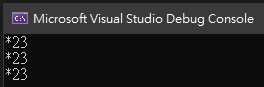
其結果為
說明:
1、當設成 RegexOptions.Multiline 時,「^」與「$」的意思將由一字串的開頭與結尾,
轉變為每行字串的開頭與結尾。
2、RegexOptions.Multiline 與 RegexOptions.Singleline 不是互斥關係。
四、ExplicitCapture
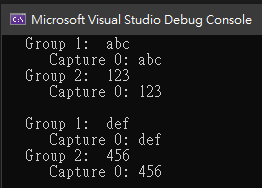
有設定 RegexOptions.ExplicitCapture 時,regular engine 將只取得有做「命名群組」的值,
非「命名群組」將不會被截取。以下示範其差別。
using System;
using System.Text.RegularExpressions;

namespace ConsoleApp1
{
    class Program
    {
        static void Main(string[] args)
        {
            string input = "abc-123,def-456,";
            string pattern = @"([a-z]{3})-(?<MyName>\d{3}),";

            MatchCollection matchCollection = Regex.Matches(input, pattern);

            foreach (Match match in matchCollection)
            {
                for (int groupsCount = 1; groupsCount < match.Groups.Count; groupsCount++)
                {
                    Console.WriteLine("   Group {0}:  {1}", groupsCount, match.Groups[groupsCount].Value);
                    int captureCount = 0;
                    foreach (Capture capture in match.Groups[groupsCount].Captures)
                    {
                        Console.WriteLine("      Capture {0}: {1}", captureCount, capture.Value);
                        captureCount++;
                    }
                }
                Console.WriteLine();
            }
        }
    }
}
其結果為
using System;
using System.Text.RegularExpressions;

namespace ConsoleApp1
{
    class Program
    {
        static void Main(string[] args)
        {
            string input = "abc-123,def-456,";
            string pattern = @"([a-z]{3})-(?<MyName>\d{3}),";

            MatchCollection matchCollection = Regex.Matches(input, pattern, RegexOptions.ExplicitCapture);

            foreach (Match match in matchCollection)
            {
                for (int groupsCount = 1; groupsCount < match.Groups.Count; groupsCount++)
                {
                    Console.WriteLine("   Group {0}:  {1}", groupsCount, match.Groups[groupsCount].Value);
                    int captureCount = 0;
                    foreach (Capture capture in match.Groups[groupsCount].Captures)
                    {
                        Console.WriteLine("      Capture {0}: {1}", captureCount, capture.Value);
                        captureCount++;
                    }
                }
                Console.WriteLine();
            }
        }
    }
}
其結果為
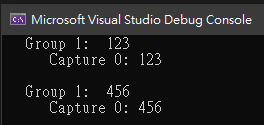
五、Compiled
在 .Net,Regular expression 預設是「直譯式」,
如果你的程式需要被執行多次,有效能考量時,
請設成「編譯式」(Compiled)。
六、Singleline
using System;
using System.Text.RegularExpressions;

namespace ConsoleApp1
{
    class Program
    {
        static void Main(string[] args)
        {
            string pattern = @".";
            string str = "1\n1\u000a1";
            string result = Regex.Replace(str, pattern, "*");
            Console.WriteLine(result);
        }
    }
}
其結果為
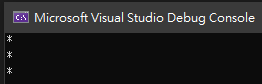
說明:
當沒有設定 RegexOptions.Singleline 時,「.」的意思是任一字元,除了「跳行」之外。
using System;
using System.Text.RegularExpressions;

namespace ConsoleApp1
{
    class Program
    {
        static void Main(string[] args)
        {
            RegexOptions regexOptions = RegexOptions.Singleline;
            string pattern = @".";
            string str = "1\n1\u000a1";
            string result = Regex.Replace(str, pattern, "*", regexOptions);
            Console.WriteLine(result);
        }
    }
}
其結果為
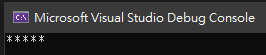
說明:
當有設定 RegexOptions.Singleline 時,「.」的意思是任一字元,沒有例外。
額外一例
using System;
using System.Text.RegularExpressions;

namespace ConsoleApp1
{
    class Program
    {
        static void Main(string[] args)
        {
            RegexOptions regexOptions = RegexOptions.Singleline;
            string pattern = @".";
            string str = Environment.NewLine;
            string result = Regex.Replace(str, pattern, "*", regexOptions);
            Console.WriteLine(result);
        }
    }
}
其執行結果為
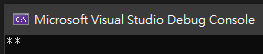
說明:
Environment.NewLine 也是「跳行」,當有設定 RegexOptions.Singleline 時,
其執行應該也只會跑出一顆星,為何是兩顆星呢?
原因在於,Environment.NewLine 等於「\r」+「\n」,自然會被識為兩字元囉。
七、IgnorePatternWhitespace
1、「 」、「\s」兩者皆表示為空白,但設定了 RegexOptions.IgnorePatternWhitespace之後,
regular expression engine 只會認得「\s」這 pattern 了。
2、當設定了 RegexOptions.IgnorePatternWhitespace之後,
一個 pattern 的「#」字號後面皆為註解。
using System;
using System.Text.RegularExpressions;

namespace ConsoleApp1
{
    class Program
    {
        static void Main(string[] args)
        {
            string input = "I'm comment";
            string pattern = "[\\s]#I'm comment";
            string result = Regex.Replace(input, pattern, "*", RegexOptions.IgnorePatternWhitespace);
            Console.WriteLine(result);
        }
    }
}
其結果為
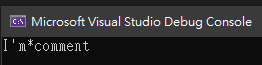
3、就算是設定了 RegexOptions.IgnorePatternWhitespace 「 」也不能視而不見
using System;
using System.Text.RegularExpressions;

namespace ConsoleApp1
{
    class Program
    {
        static void Main(string[] args)
        {
            string input = " ";
            string pattern = "[ ]";
            string result = Regex.Replace(input, pattern, "*", RegexOptions.IgnorePatternWhitespace);
            Console.WriteLine(result);
        }
    }
}
其結果為
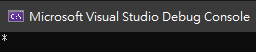
4、通常會設定 RegexOptions.IgnorePatternWhitespace 是為了 pattern 的可讀性。
八、RightToLeft
using System;
using System.Text.RegularExpressions;

namespace ConsoleApp1
{
    class Program
    {
        static void Main(string[] args)
        {
            string input = "bot tob big ";
            string pattern = @"\bb\w+\s";
            Match m = Regex.Match(input, pattern, RegexOptions.RightToLeft);

            while (m.Success)
            {
                Console.WriteLine(m.Value);
                m = m.NextMatch();
            }
        }
    }
}
其結果為
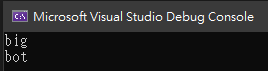
說明:
當設定了 RegexOptions.RightToLeft 時,表示比對是從字串的右邊比到左邊,
而不是連 pattern 也要從右一個個單元比到左邊。
九、ECMAScript
RegexOptions.ECMAScript 可以和
RegexOptions.IgnoreCase 與 RegexOptions.Multiline 一起設定,
而其餘的 RegexOptions 皆不得和 RegexOptions.ECMAScript 一起設定。
ECMAScript 與 canonical regular expressions 有三個不同
1、character class syntax
ECMAScript 不支援 Unicode Property,而 canonical regular expressions 支援。
2、self-referencing capturing groups
using System;
using System.Text.RegularExpressions;

namespace ConsoleApp1
{
    class Program
    {
        static string pattern;

        static void Main(string[] args)
        {
            string input = "aa aaaa aaaaaa ";
            pattern = @"((a+)(\1) ?)+";

            // Match input using canonical matching.
            AnalyzeMatch(Regex.Match(input, pattern));

            // Match input using ECMAScript.
            AnalyzeMatch(Regex.Match(input, pattern, RegexOptions.ECMAScript));
        }

        private static void AnalyzeMatch(Match m)
        {
            if (m.Success)
            {
                Console.WriteLine("'{0}' matches {1} at position {2}.",
                                  pattern, m.Value, m.Index);
                int grpCtr = 0;
                foreach (Group grp in m.Groups)
                {
                    Console.WriteLine("   {0}: '{1}'", grpCtr, grp.Value);
                    grpCtr++;
                    int capCtr = 0;
                    foreach (Capture cap in grp.Captures)
                    {
                        Console.WriteLine("      {0}: '{1}'", capCtr, cap.Value);
                        capCtr++;
                    }
                }
            }
            else
            {
                Console.WriteLine("No match found.");
            }
            Console.WriteLine();
        }

        // The example displays the following output:
        //    No match found.
        //
        //    '((a+)(\1) ?)+' matches aa aaaa aaaaaa  at position 0.
        //       0: 'aa aaaa aaaaaa '
        //          0: 'aa aaaa aaaaaa '
        //       1: 'aaaaaa '
        //          0: 'aa '
        //          1: 'aaaa '
        //          2: 'aaaaaa '
        //       2: 'aa'
        //          0: 'aa'
        //          1: 'aa'
        //          2: 'aa'
        //       3: 'aaaa '
        //          0: ''
        //          1: 'aa '
        //          2: 'aaaa '
    }
}
3、octal versus backreference interpretation
| Regular expression | Canonical behavior | ECMAScript behavior |
| \0 followed by 0 to 2 octal digits | Interpret as an octal. For example, \044 is always interpreted as an octal value and means "$". | Same behavior. |
| \ followed by a digit from 1 to 9, followed by no additional decimal digits, | Interpret as a backreference. For example, \9 always means backreference 9, even if a ninth capturing group does not exist. If the capturing group does not exist, the regular expression parser throws an ArgumentException. | If a single decimal digit capturing group exists, backreference to that digit. Otherwise, interpret the value as a literal. |
| \ followed by a digit from 1 to 9, followed by additional decimal digits |
Interpret the digits as a decimal value. If that capturing group exists, interpret the expression as a backreference. Otherwise, interpret the leading octal digits up to octal 377; that is, consider only the low 8 bits of the value. Interpret the remaining digits as literals. For example, in the expression \3000, if capturing group 300 exists, interpret as backreference 300; if capturing group 300 does not exist, interpret as octal 300 followed by 0. |
Interpret as a backreference by converting as many digits as possible to a decimal value that can refer to a capture. If no digits can be converted, interpret as an octal by using the leading octal digits up to octal 377; interpret the remaining digits as literals. |
十、CultureInvariant
各國的語言不同,有可能 regex engine 在判斷上也有所差異,
要解決其問題可去設定 RegexOptions.CultureInvariant。